

Numerous providers
Clouds, databases, AI, and developer tools, side by side.
Connect in minutes
A read-only credential per provider. Nothing to deploy, nothing to schedule.
Same answers everywhere
Every view, insight, and tool covers every connected provider.
What connecting changes
Every provider you connect feeds the same place, so “what did we spend last month, and why is it up?” stops being four consoles and a spreadsheet. It is one question, and the answer covers everything you connected.Six ways to connect
CostGraph pulls it
Give us a read-only credential and your spend keeps itself current. This is how most
providers work, and it is the fastest way to start.
You push it
Send your billing data to us instead. Your credentials stay in your infrastructure,
and it covers anything we cannot reach: an internal chargeback system, a warehouse
job, a private cloud.
We read your telemetry
An AI gateway in your cluster has no bill to read. CostGraph reads its token
metrics through the operator and prices them against the model catalog.
CostGraph exports it
The other direction: report each customer’s attributed spend to your billing
platform, so you can bill them for it.
You run the agent
A bill tells you what a cluster or a host cost. The agent tells you what ran on it.
Install it once and every node, pod, volume, and machine reports its own usage.
CostGraph files tickets
Turn an anomaly or a recommendation into an issue in Jira, Linear, or GitHub, so
the fix lands in the queue your team already works from.
Not sure which you want? Start with a pull connection. You can add the others later
without changing anything that already works.
Providers
Compute

Akamai Cloud (Linode)
Every line item on the invoice.

Alibaba Cloud
Daily spend per instance, prepaid or pay-as-you-go.

Amazon Web Services
Your AWS bill, down to the resource.

Cherry Servers
Bare metal, priced per server.

Daytona
Dev sandboxes, priced per resource, with idle signals.

Depot
Container build and runner minutes, with cache savings.

DigitalOcean
Droplets, volumes, load balancers, databases, spaces.

Google Cloud
Your Google Cloud bill, down to the resource.

IBM Cloud
The native monthly cost report, per resource instance.

Microsandbox Cloud
Sandbox usage against your plan’s included pool.

Microsoft Azure
Your Azure bill, down to the resource.

Modal
Serverless GPU and compute, per function.

Object Store
A FOCUS bill published to S3, Azure Blob, or any S3-compatible store, read by the exporter.

Oracle Cloud Infrastructure
Native FOCUS cost reports, per compartment and resource.

OVHcloud
Every product on the bill, with Public Cloud usage per project.

RunPod
GPU pods and serverless, per GPU type.

Scaleway
Per project and per resource.

STACKIT
Managed services, attributed per project.

Ubicloud
VMs, PostgreSQL and Kubernetes at published rates, with stale runner cache.

UpCloud
Monthly spend per server, disk and managed service.

Vercel
Team spend, split by project.

Vultr
Invoice lines plus charges not yet invoiced.
AI and Machine Learning
Model spend sits next to infrastructure spend, so the AI line stops being a separate argument at the end of the month.
AI gateways
Token usage from Envoy AI Gateway, agentgateway, APISIX, and vLLM, priced by us.

Anthropic
Spend per model.

Baseten
Model APIs per token, dedicated serving per minute.

Cursor
Team usage, per model and per member.

ElevenLabs
Character and credit usage, with unused-quota signals.

Fireworks AI
Token spend per model, plus idle GPU hours on dedicated deployments.

Helicone
Gateway spend across every upstream provider.

LiteLLM
Gateway spend per key, model, and team.

New API
Self-hosted LLM gateway spend, per model and key.

OpenAI
Spend per model.

OpenRouter
One connection covers every model you route through it.
RespanAI
Request spend across every routed model.

TrueFoundry
Enterprise LLM gateway spend, per model, with cache savings.

xAI
Grok spend per model.
Databases

ClickHouse
Usage cost per service, with idle/scale-to-zero signals.

PlanetScale
Database spend, plus rightsizing for the databases behind it.

Redis Cloud
Per subscription and per database.
Analytics

Confluent Cloud
Kafka spend per cluster and environment.
Developer Tools

Blacksmith
Billed runner minutes and your rate, on top of GitHub.

Buildkite
CI seats, with idle-seat signals.

Convex
Backend usage against plan allowances, plus developer seats.

GitHub
Billing, Copilot seats, and every Actions job on every runner.

Hatchet
Task-run cost per tenant, with failed-run waste.
Networking

Cloudflare
Usage across every Cloudflare product.
Management and Governance

CostGraph
Your CostGraph invoice, in the same view as everything else.

Datadog
What Datadog itself costs you, by product.

Grafana Cloud
Metrics, logs, traces, and profiles per stack.

PagerDuty
License seats, and the people holding one who no longer respond.
Agent
A bill stops at the resource. These two go inside it, so a node’s cost can be split across the namespaces and containers that actually used it.
Kubernetes
Nodes, namespaces, workloads, and volumes, with idle capacity and rightsizing.
Virtual machines
Hosts and their disks, with utilization, containers, and idle detection.
Billing exports

Autumn
Meter a customer’s attributed spend against one of your Autumn features.

Chargebee
Record a day’s spend against a metered item price on a subscription.

Lago
Send it as events on a billable metric, self-hosted or on Lago Cloud.

Metronome
Send it as usage events for a billable metric to rate and invoice.

OpenMeter
Meter it per subject, on OpenMeter Cloud, Kong Konnect or self-hosted.

Orb
Ingest it as events for the metric your pricing is built on.

Stripe
Report it to a Stripe billing meter and let Stripe invoice from it.
Ticketing
Ticketing connections send work out instead of reading spend in. Each Jira site, Linear workspace, or GitHub organization you connect is its own connection, marked Ticketing under Your connections.GitHub issues
Issues in private repositories, through the CostGraph GitHub App.
Jira
Issues in the Jira Cloud projects you allow.
Linear
Issues in the Linear teams you allow.
Anything else

Send your own data
A provider we do not list, an internal chargeback system, a private cloud. Send it
yourself and it behaves like any other connected source.
Connecting one
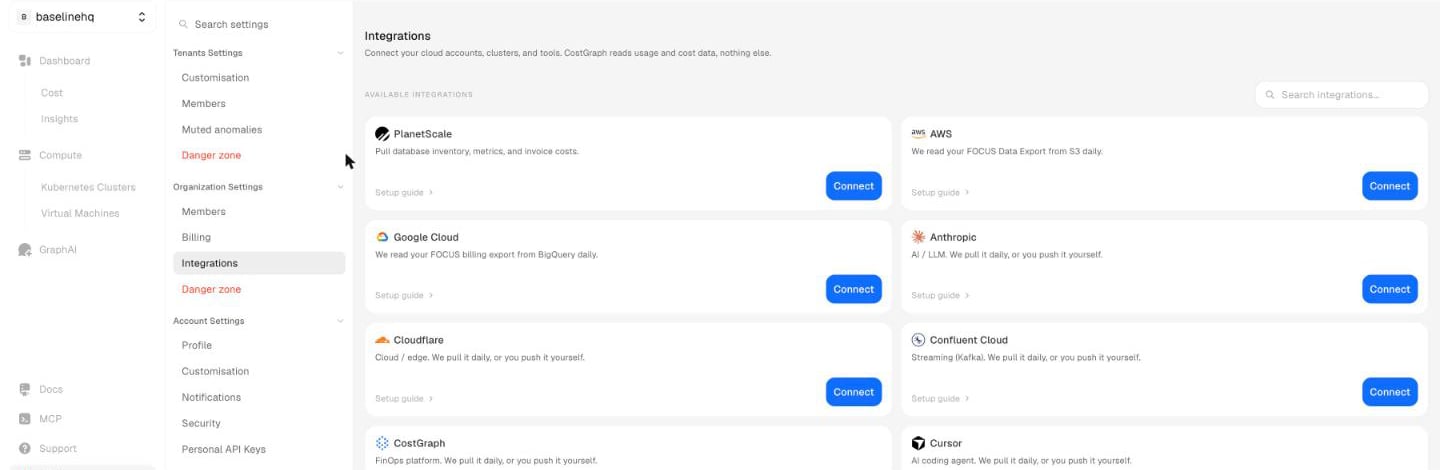
Settings -> Integrations. Every provider, with a setup guide next to it.
1
Pick the provider
Open Settings > Integrations and choose it from the catalogue.
2
Name the connection and pick the tenant
The tenant decides which team or environment the charges belong to.
3
Enter the credential and connect
The form asks for exactly what that provider needs and explains the permission each
value requires. We check the credential before saving, so a wrong value fails while
you are still on the form rather than silently at 3am.
Credentials are encrypted at rest and used only to read billing data. Revoke the key at
the provider and that connection stops. Nothing else is affected.
What you get back
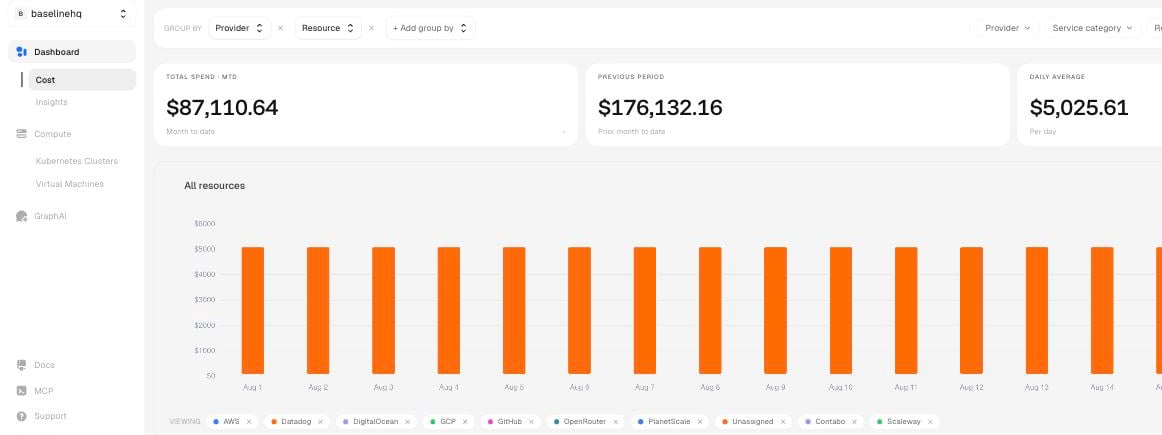
One total, one trend, stacked by provider.
Cost Overview
Month-to-date and historical spend, sliced by provider, service, and team.
Anomaly detection
Spikes, waste, and drift, caught inside a provider and across providers.
Recommendations
Rightsizing and cheaper placements, priced before you commit to them.
MCP and the agent
Ask about any connected provider from your editor or from chat.